

Mastering Component Communication: From Angular to AngularJS
Introduction
Have you ever had to transition from one technology to another? For example, you might be familiar with Angular but have never worked with AngularJS before. Today, we’ll explore an easy way to compare Angular and AngularJS through a common and essential feature: component communication.
What are the Advantages of Components in Angular and Why Use Them to Explain Angular and AngularJS?
Imagine having the power to enhance communication through small, testable pieces of your application. Components in Angular allow modular, reusable, and testable UI elements that significantly improve both the developer experience and the user experience.
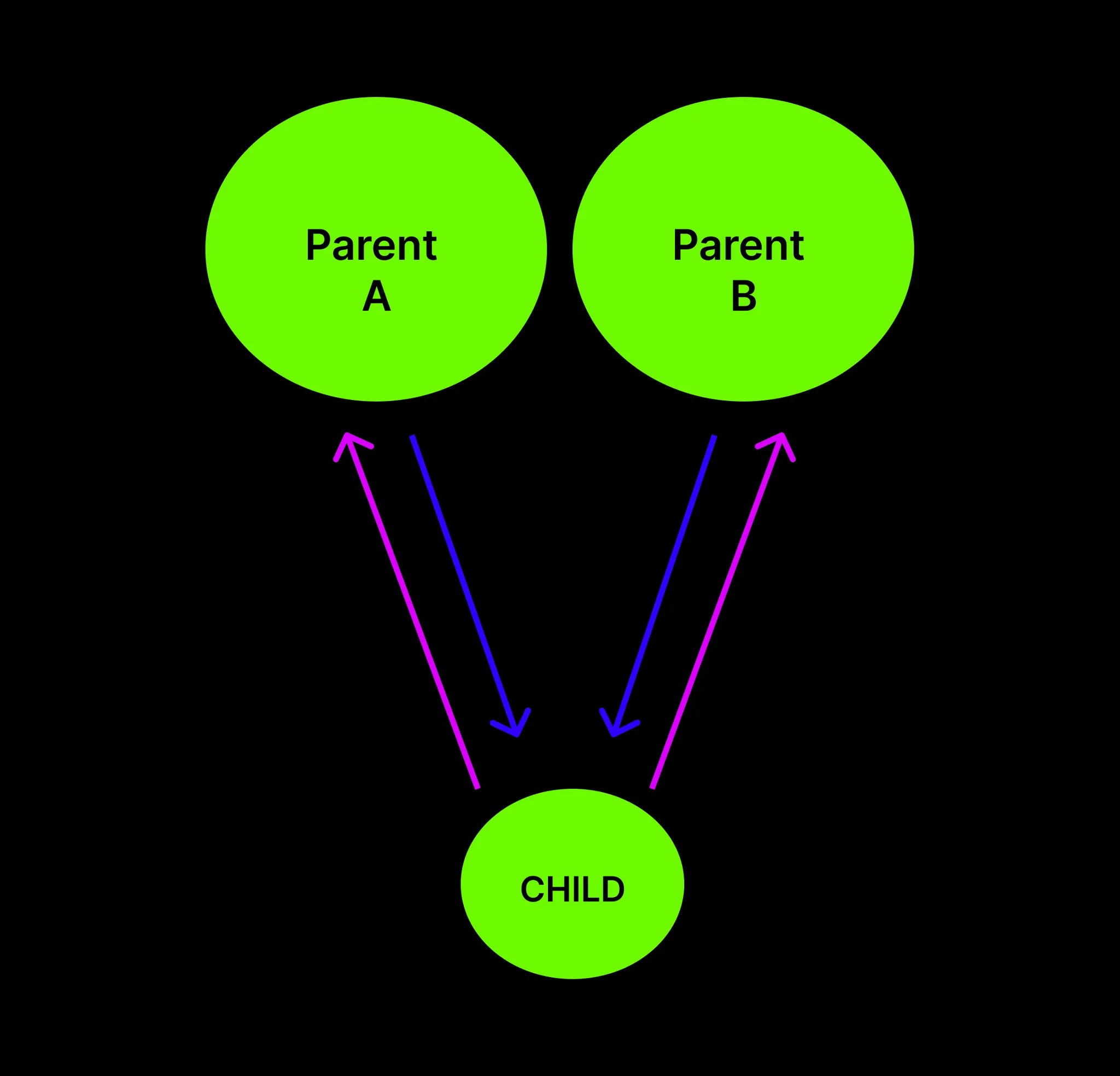
In this post, I’ll demonstrate how the two parent components can interact with a single child component, producing different results based on inputs, and how the child component can emit events back to the parents. This simple demonstration will help you understand the differences between Angular and AngularJS.
Diagram.
Here we have a simple diagram from what we are going to build in this post. Two different parents consuming the same child and waiting for a different result from the same component.
Inputs, Outputs and the Child Component.
Before diving into the implementation of our child component, it’s essential to understand the concepts of Inputs and Outputs in Angular. These mechanisms are the backbone of communication between parent and child components in Angular applications.
Inputs (): Inputs allow a parent component to pass data to its child component. By using the decorator, we can define properties in the child component that will receive values from the parent. This data binding mechanism is crucial for configuring and customizing the behavior and appearance of child components based on the context provided by the parent component.
Outputs (): Outputs, on the other hand, enable the child component to send data back to the parent component. Using the decorator along with the class, a child component can emit events that the parent component can listen to and handle accordingly. This event-driven communication is vital for interactions such as user actions, state changes, or other significant events within the child component that need to be communicated back to the parent.
Understanding and effectively utilizing Inputs and Outputs allows for a clean and maintainable architecture where components can interact without problems. In the next sections, we’ll see how these concepts are implemented in a practical example, showcasing how two parent components can communicate with a shared child component, each producing different results based on the inputs provided and handling the outputs emitted by the child component.
Child Component (ChildComponent):
The is designed to receive two inputs from its parent components: a and a boolean . Based on the value of , the child component modifies the message it emits back to the parent. If is true, the emitted message includes additional text indicating special processing. This demonstrates how the same child component can exhibit different behaviors depending on the inputs it receives.
First Parent Component (ParentAComponent):
The passes a specific message and sets to true when interacting with the . This configuration triggers the child component to apply special processing to the message. When the child component emits the modified message, the parent component handles the notification and updates its response accordingly.
Second Parent Component (ParentBComponent):
The also interacts with the but passes a different message and sets to false. This configuration ensures that the child component emits a message without special processing. Upon receiving the notification from the child, the parent component handles it and updates its response similarly to the first parent component but based on the different input values.
Let’s talk about AngularJS
Introduction to Binding and Communication Between Components in AngularJS
Before diving into the AngularJS implementation of our components, it’s essential to understand how component communication works in AngularJS. Similar to Angular, AngularJS also facilitates component interaction through binding and event handling mechanisms, although the syntax and concepts differ slightly.
Data Binding in AngularJS
AngularJS uses a two-way data binding approach by default, meaning that any changes in the model are immediately reflected in the view and vice versa. However, when dealing with components, AngularJS allows for more controlled, one-way data binding using directives and specific binding notations.
Component Bindings:
(one-way binding): This binds a parent scope property to a child component, ensuring changes in the parent are propagated to the child but not vice versa.(output binding): This binds an expression to the component, allowing the child component to call functions defined in the parent scope, enabling event-based communication.
These bindings ensure that data flows efficiently and predictably between parent and child components.
Inputs and Outputs in AngularJS
While Angular uses and decorators to manage data flow and event handling, AngularJS uses binding symbols in the component definition:
Inputs (): Inputs in AngularJS are defined using the binding symbol. This symbol tells AngularJS to bind a property from the parent scope to the child component. Changes in the parent scope are automatically reflected in the child component.
Outputs (): Outputs are defined using the binding symbol. This allows a child component to call a method in the parent scope, effectively emitting an event that the parent can handle.
Understanding these concepts is crucial for implementing efficient component communication in AngularJS. In the following sections, we will demonstrate these principles with practical examples, comparing them with their Angular counterparts.
Example Components in AngularJS
In the code below, we aim to draw parallels with the same components implemented in Angular, but now using AngularJS. This will illustrate the differences and similarities in component communication between the two frameworks.
Child Component (childComponent):
In AngularJS, the uses bindings to receive data from the parent controllers ( and ) and to emit events back to the parent (). The function builds the response message based on the value of , similar to the Angular child component.
First Parent Component (ParentAController):
The in AngularJS sets up the message and special flag, and it defines a method to handle notifications from the child component. This controller is associated with a view () that uses AngularJS directives to bind the data and events to the .
Second Parent Component (ParentBController):
The operates similarly to the first parent controller but with different values for the message and special flag. It demonstrates how different parent controllers can interact with the same child component, leading to different behaviors based on their configurations.
Descriptions and Parallels
Summary
By comparing these AngularJS components with modern Angular, you can see some key differences:
- Binding Syntax: AngularJS uses bindings in the
declaration and AngularJS directives (,, etc.) in the HTML templates, whereas Angular usesanddecorators in TypeScript classes. - Event Handling: AngularJS uses a callback function defined in the parent scope and passed to the child component, while Angular uses
for this purpose. - Controller vs. Class Components: AngularJS relies on controllers and scope, whereas Angular uses class-based components with strong typing and decorators.
Bonus Track: Using $broadcast and $emit in AngularJS
When transitioning from Angular to AngularJS, one of the significant differences in component communication is the use of and . These methods can greatly simplify communication between components, especially when you want to avoid prop drilling.
Understanding $broadcast and $emit
: Sends an event downwards from the current scope to all child scopes.: Sends an event upwards from the current scope to all parent scopes.
Avoiding Prop Drilling
One of the common challenges in component-based architectures is prop drilling, where data or events need to be passed through multiple layers of components. This can make the code harder to maintain and understand. Instead of passing data down through each component, or events back up through each component, you can use and for more direct communication.
Use Case Example
Imagine a scenario where a parent component needs to notify all its children and grandchildren components of a particular event. Instead of passing the event through each layer, you can use to notify all descendant components directly.
Parent Controller
Child Controller
Grandchild Controller
HTML Template
Why This Matters
- Avoids Prop Drilling: No need to pass data or events through intermediate components.
- Simplifies Communication: Directly communicate with all child or parent components.
- Decouples Components: Components don’t need to know about the structure of other components in the hierarchy.